Recipe Generator
I cook a lot. And I found it inconvenient to follow a cooking tutorial video while I'm actually cooking. So, I tried to summarize the footage using Gemini, ChatGPT, and Perplexity. They either made up parts of the recipe, used a different one from the internet, or failed because the video didn't have subtitles. Therefore, I created one myself.
Here is a comparison of my bot and other available AIs.
What it does
The Recipe Generator is a custom bot I built to run in my personal "Notes" Discord server. You can join the server here to try it out.
When you submit a YouTube link, the bot processes the video and returns a recipe in a consistently structured format. The summary always includes all the critical information:
- Portion size
- Cook time
- Ingredients, which are neatly sectioned and automatically converted into SI units.
To ensure the generated recipe is as accurate and complete as possible, the bot performs a few extra steps:
- For videos that lack subtitles, it uses Cloudflare AI services to transcribe the audio.
- It also pulls and utilizes any relevant information from the video description.
- Crucially, the bot is prompted to not hallucinate or invent missing information.
How it works
I tried to "Vibe Code" the program, but apparently it's not as easy as just prompting for what I want. I ended up having to iterate on the prompt, fixing all kinds of hallucinations and giving explicit instructions, and eventually got it working. Anyway, here is how it works:
It consists of two parts:
- A Discord bot that parses the link, obtains the transcript and video description, then generates a recipe using the given information.
- Transcriber, used to generate a transcript when there is no subtitle in the video.
Discord bot
The discord bot based on my previous step of this project "Transcriber" back in 30 May 2025. The bot already have the basic functions, and I ask Gemini CLI to modify it.
Task: Edit bot2.js

bot2.js now does the following:
(Done)Input: a link or file
(Done)Process 1: Convert to transcript
Process 2: Use Gemini to generate recipe
Process 3: Output the recipe to user

Note: GEMINI_API_TOKEN is saved on .env file

Gemini should use the prompt from "prompt.js"
and the prompt as follow:
(see the prompt section)
Transcriber
The transcriber does the following:
- Fetch existing YouTube transcripts (if available).
- Generate transcriptions from any YouTube, video, or audio link — including Discord attachments.
- Transcribe in parallel, achieving 2–6× faster speeds.
- Completely free to use.
Converting audio to text
I've tested and compared most of the speech to text (ASR) options available, including self hosted, Azure, OpenAI, and third party services.
For my transcriber, I chose Cloudflare's whisper-large-v3-turbo. Cloudflare provides a free quota of 10,000 neurons, which is roughly equivalent to 4.5 hours of transcription.
Parallel transcribing
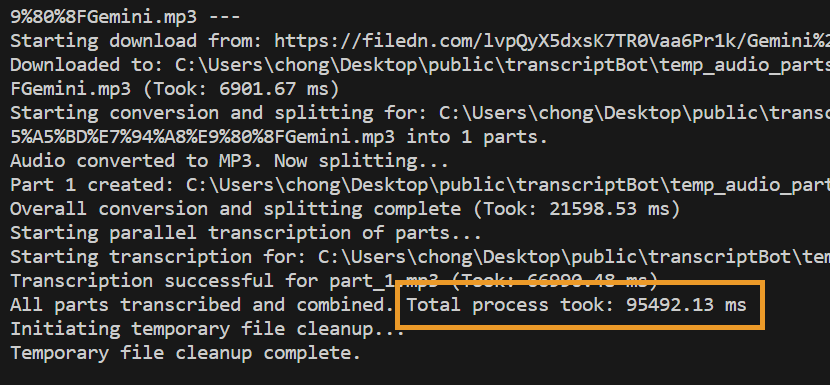
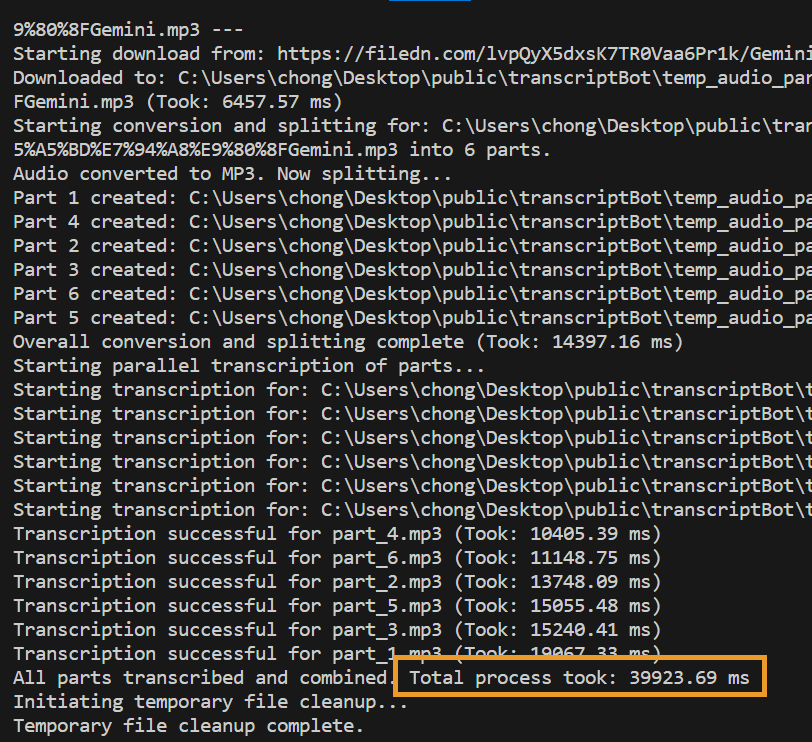
By dividing the audio into segments and transcribing them in parallel, the transcription process becomes significantly faster. In the example below, this approach reduced the total processing time by 60% (55 seconds). Cloudflare supports up to 16 concurrent requests and this example uses 6, which means it will be even faster when processing longer audio.
However, splitting audio introduces overhead, and excessive segmentation can reduce transcription coherence. To balance performance and accuracy, a minimum chunk length of 150 seconds is set.
No splitting:
Spited:
Spec Coding
After multiple times of iterations, I come up with the following prompts that can generate the program in one go. This prompt also explains how this program works.
Code in NodeJS, CommomJS:
export the function as getTranscript(link)

Important:
- const fs = require('fs').promises; // Use fs.promises for async operations
- const fsSync = require('fs'); // Use fsSync for synchronous operations like checking file existence
- Use as few npm package as possible. Use fluent-ffmpeg,axios,fs,path,ytdl-core
- Provide a usage example with sample audio URL: https://filedn.com/lvpQyX5dxsK7TR0Vaa6Pr1k/Gemini%20%E7%AA%81%E7%84%B6%E7%9C%9F%E9%A6%99%E4%BA%86%20%E5%A6%82%E4%BD%95%E7%94%A8%E5%A5%BD%E7%94%A8%E9%80%8FGemini.mp3
- My cloudflare account: 6cef0b2f126356a3dee567e091e44d0f

Func:
download audio from link, or youtube link
split the audio into X part,
call cloudflare's whisper-large-v3-turbo API,
obtain each transcript,
Combine Transcript
return as string

Input: Audio file URL / Youtube link
Output: String of transcipt

Steps:
1. If the link is youtube url, download the file using ytdl, add .mp3 extention to the file.
2. If the link is general URL, Download audio file from URL
3. if audio file is not mp3, convert into mp3 using toMP3()
4. If the audio is less than 150s*16, split into 150s each, else split evenly into 16 chunks
5. Store their path in "files" array
6. Use map to transcribe() "files" array
7. get back a array of strings
8. Combine those strings and return a single string

toMP3():
use node-ffmpeg to convert any audio file into mp3

convert(X):
use node-ffmpeg to
1. Splite MP3 into X MP3 files
2. return arrays of string containes file paths.

transcribe():
1. use axios, use get method with JSON body
2. 'audio' string required, Base64 encoded value of the audio data.
3. WHISPER_API_URL = `https://api.cloudflare.com/client/v4/accounts/${CLOUDFLARE_ACCOUNT_ID}/ai/run/@cf/openai/whisper-large-v3-turbo`;
ref:https://developers.cloudflare.com/workers-ai/models/whisper-large-v3-turbo/
4. If the segment transcribe failed, retry one more time
Library fails
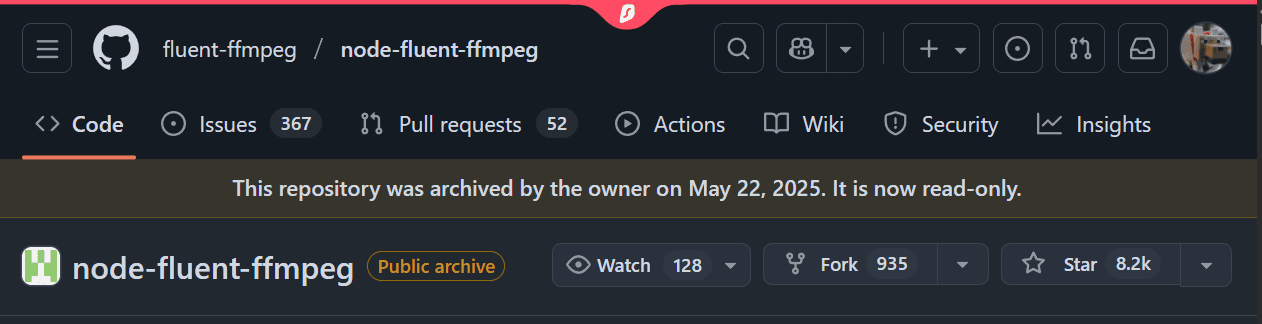
It was very discouraging that the application broke without me doing anything wrong.
- Since Google doesn't want people to crawl their data for AI use, many YouTube-related packages often fail or need frequent updates
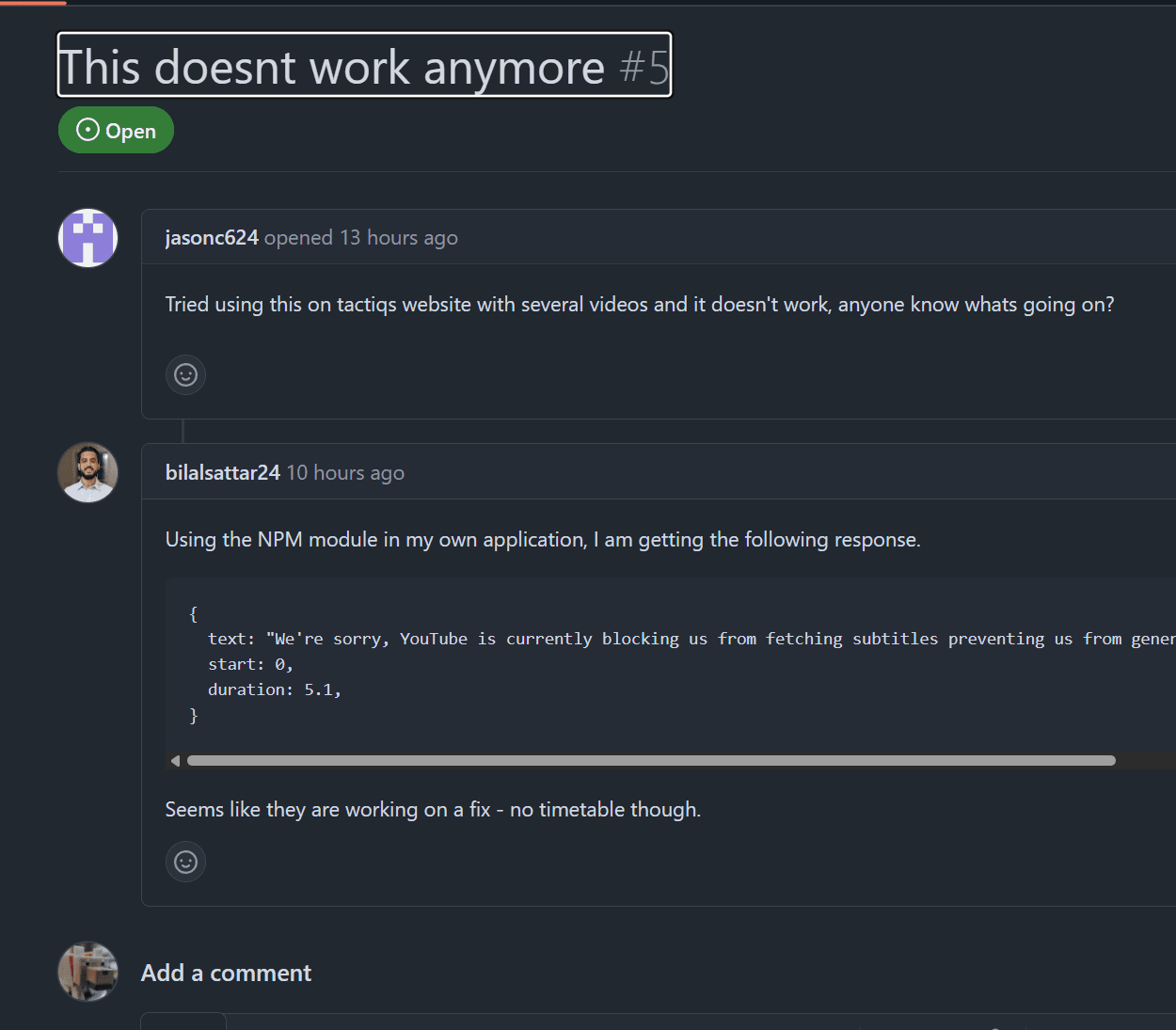
- And ytdl-core is dead
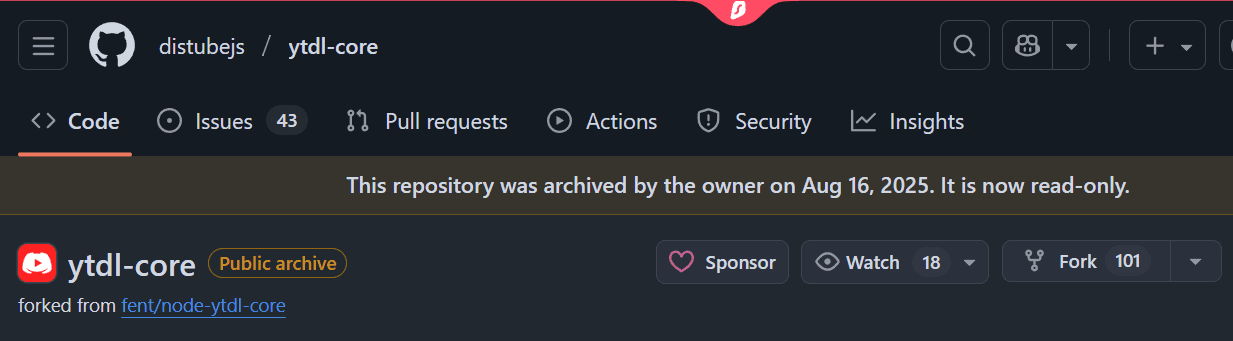
- So as fluent-ffmpeg
Solution
If I were doing traditional coding, three libraries failing like this would mean a complete rewrite of the program, and I might already give up.
Fortunately, I took spec coding approach, which means that by changing some prompts, asking AI to use a more reliable library youtube-dl-exec, and using native ffmpeg, my program can get going again.
The prompt
I used OpenAI's GPT-5 Prompt Optimizer to help construct this prompt, and here are some explanations about it:
-
Keep the recipe within 2000 characters: Discord messages are limited to 2000 characters. Exceed this limit, and the recipe will be sent as a Markdown file instead.
-
If any required information is missing, write N/A: LLMs often hallucinate, and the worst scenario is that I cannot differentiate real and fake information. Explicitly ask it to put N/A, so that LLMs won't make it up.
-
Begin with a concise checklist (3-7 bullets) of what you will do (Adviced by the optimizer): It is a Chain of Thought (CoT) approach, it helps the LLM break down the problem.
-
An Example: This is one shot prompting, that help LLM understand where those
{varialbe}should be filled.
const getPrompt = (cleanTranscript, videoDescription) => `
# Role and Objective
- Generate a recipe using a structured Markdown template based on the provided source details.

# Instructions
- Keep the recipe within 2000 characters.
- Use Chinese or English, transcript language is preferred.
- If any required information is missing, write N/A in the corresponding placeholder.
- Use SI units (grams, milliliters) by default for all ingredient amounts, unless otherwise specified.
- Produce output strictly in Markdown format.
- Begin with a concise checklist (3-7 bullets) of what you will do; keep items conceptual, not implementation-level.
- Output the Recipe only, no additional output.

## Recipe Template

# {FOOD_NAME} Recipe:
- For {NUM} Serves.
- Prep Time: {X mins}
- Cook Time: {Y mins}

## Ingredients
- Create a section for each ingredient part (e.g., 'Main Ingredient', 'Sauce', 'Garnish'), following the order in the source.
- For each part, list each ingredient in the format:

  {PART NAME}:
  - {Item}, ({Prep State: e.g., Diced/Minced, or N/A}): {Amount in SI unit or as described}

- If there are more than two ingredient parts, add additional sections (e.g., "Part C: Garnish").
- If any specific detail is missing for an item, enter N/A for that field.

## Steps
- List recipe steps as sequentially numbered sections, in the exact order found in the source.
- Do not limit to only two steps—include every step from the source.
- Groups step together. One Step can contain multiple sub-steps.
- For each step, use the following format:

  ## Step {step_number}:
  - {List instruction in bullet points, bolding keywords}

## Key Notes and Tips
- **Chef's Tip:** {List important tips or advice. If absent, write N/A.}
- **Substitution:** {Provide alternative ingredients/equipment, or N/A if not provided.}
- **Storage:** {Instructions for leftovers, or N/A if not mentioned.}

---
Video Transcript:
${cleanTranscript}

---
Video Description:
${videoDescription}

## Example Output

# Tomato Soup Recipe:
- For 4 Serves.
- Prep Time: 10 mins
- Cook Time: 30 mins

## Ingredients
Main Ingredient:
- Tomato, (Chopped): 500 grams
- Onion, (Diced): 50 grams

Sauce:
- Olive oil, (N/A): 2 tablespoons

Garnish:
- Basil leaves, (N/A): 5 grams

## Step 1:
- **Heat** olive oil in a pot.
- **Add** onions and sauté until translucent.

## Step 2:
- **Add** tomatoes and **cook** for 20 minutes.

## Step 3:
- **Blend** the mixture until smooth, then **season** to taste.

## Key Notes and Tips
- **Chef's Tip:** Use ripe tomatoes for better flavor.
- **Substitution:** Use sunflower oil if olive oil unavailable.
- **Storage:** Refrigerate for up to 3 days.
`;

module.exports = getPrompt;